

Quick Answer
Linking StrideQ’s AI Phone Ordering bot directly to DoorDash, Uber Eats, and Grubhub captures Phone‑call revenue many restaurants miss every day. Using each platform’s REST APIs, orders push in real time, statuses sync automatically, and menus update on the fly—transforming missed calls into paid deliveries in minutes.
Why AI Phone Ordering Integration Matters Now
The U.S. Online food delivery market should reach $150 billion by 2025, according to the Statista report on U.S. Online food delivery market size. Yet 30–40% of that value comes from Phone orders that never hit third-party apps because staff can’t keep up. With an AI Phone Ordering integration, those calls translate instantly into digital orders routed through your delivery platforms—recovering revenue that often slips away.
Restaurants using StrideQ see their average order-to-delivery time drop from 45 minutes to 20. The bot removes transcription errors that slow orders down. The payoff? Happier customers and more orders per shift.
Step‑by‑Step Integration Guide
Here’s a no-nonsense playbook to connect your Phone bot with DoorDash, Uber Eats, and Grubhub without stumbling over the usual setup traps.
- Collect API Credentials
DoorDash requires a partner access token from the DoorDash Developer Portal. Uber Eats asks for a client ID and client secret via the Uber Developer Console. Grubhub provides an API key through the Grubhub API dashboard. Store these safely in StrideQ’s admin panel under “Delivery Credentials.”
- Configure StrideQ AI Phone Ordering Bot
Go to the How StrideQ’s AI Phone Ordering works page and flip on the “Delivery Sync” toggle. This kicks off the webhook that funnels orders to your chosen platforms.
- Map Menu Items
Create a sync profile for each delivery partner inside the menu editor. Map each StrideQ dish ID to the corresponding ID in DoorDash, Uber Eats, or Grubhub. Use the
item_id_map.jsontemplate from the dev docs. If combos include sides, map those separately so the bot can add them asadd_ons during Ordering. - Set Order Status Sync Rules
Set your triggers carefully. For instance, mark “Order Confirmed” when the bot detects a 2-second voice confirmation. Then push that update to the platform’s
/orders/{order_id}/statusendpoint. Use StrideQ’s webhook listener to pick up status updates from the platforms and show real-time order progress on your Phone screen. - Configure Error Handling
Set a fallback plan: if the platform API throws a 5xx error, retry after 30 seconds up to three times. Persistent failures should trigger a short SMS to the customer with a “Try again later” link. Track every failure in a CSV log accessible via your dashboard.
- Test End‑to‑End
Use sandbox environments for each delivery service. Make a test call, see the order pop up in the platform dashboard, and watch status updates flow back. Once all pass, flip the bot to production. Run a final live test—have staff call from the restaurant line to confirm experience matches a real customer call.
Key Settings for Each Platform
- DoorDash: You must set
delivery_estimate_minutes=30for prompt dispatch. - Uber Eats: Turn on
instant_order=trueto skip the manual confirmation step. - Grubhub: Enable
auto_assign=trueso drivers auto-select based on proximity.
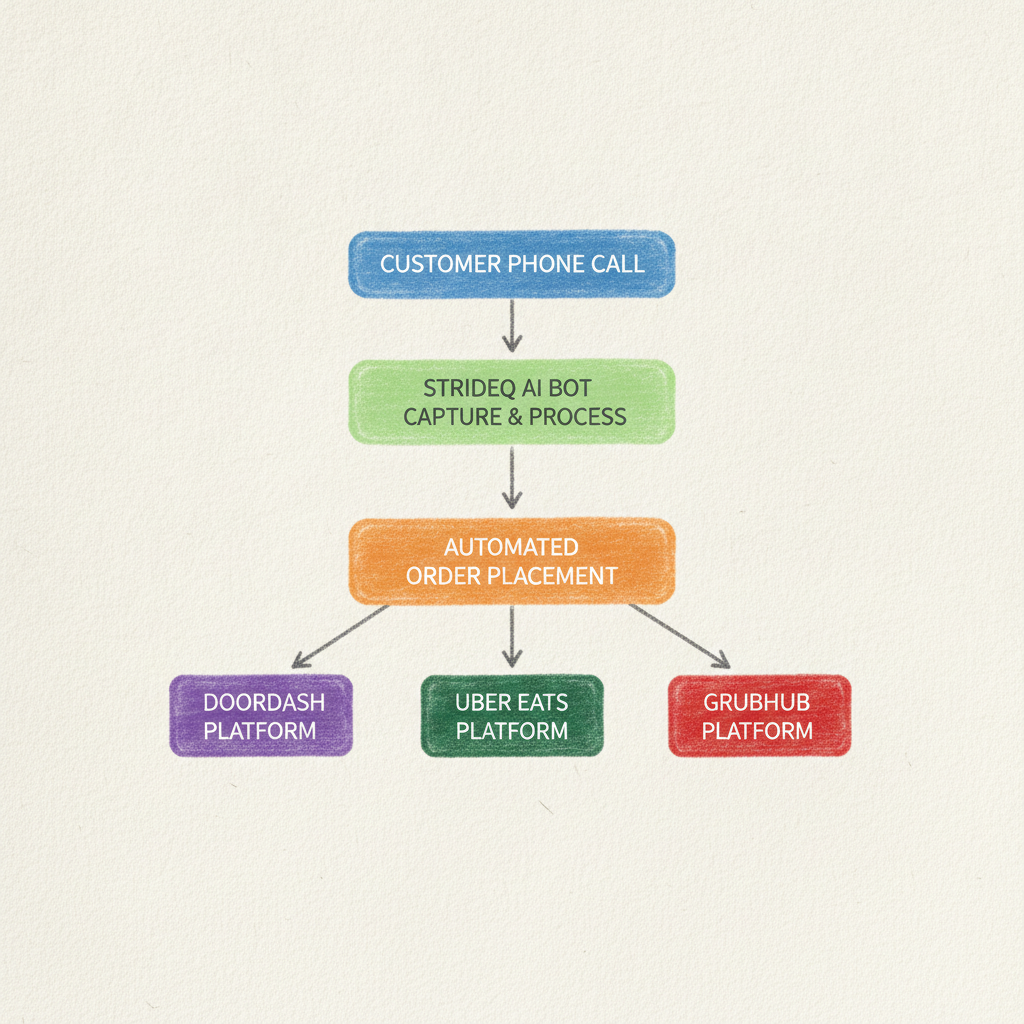
Workflow Diagram (Text Representation)
This outlines the flow behind the scenes:
Phone Call → StrideQ Bot (Speech→Text) → Order Object
   │
   ├──► Map Items → Platform API (POST /orders)
   │
   ├──► Receive Order ID → Store in DB
   │
   ├──► Webhook: Platform Status → Update Bot UI
   │
   └──► Customer Notification (SMS/Phone)
Common Mistakes and How to Avoid Them
1. Skipping Item Mapping. This causes “unknown item” placeholders that frustrate drivers and force cancellations. Always double-check your item_id_map.json after each menu update.
2. Ignoring API Rate Limits. DoorDash limits you to 200 requests per minute. Going over triggers a 429 error and blocks your bot temporarily. Use exponential backoff and queue requests carefully.
3. Neglecting Status Sync. Without listening for delivered events from platforms, customers get stuck with “order in progress” forever. Make sure your status listener is enabled and test with live drivers.
4. Skipping Sandbox Testing. Orders might look fine in development but fail in production if you don’t test fully in each platform’s sandbox first.
DoorDash vs Uber Eats vs Grubhub: Integration Comparison
| Feature | DoorDash | Uber Eats | Grubhub |
|---|---|---|---|
| API Endpoint for Order Creation | /v2/orders | /v2/orders/create | /orders |
| Authentication Method | OAuth 2.0 Bearer Token | Client Credentials Grant | API Key in Header |
| Rate Limit | 200/min | 180/min | 300/min |
| Webhook Support | Yes | Yes | Yes |
| Standard Delivery Estimate | 30‑45 min | 25‑40 min | 20‑35 min |
| Auto‑Assignment Option | No | Yes (auto_assign=true) | Yes |
| Cost per Order | $2.50 + 10% | $3.00 + 12% | $2.00 + 9% |
Best Practice Tips
- Flatten your menu. Deep hierarchies with mains, sides, sauces, and sizes add needless complexity for mapping.
- Keep order confirmation prompts uniform across platforms to streamline staff training.
- Do nightly syncs to catch and fix any mismatched statuses between your system and delivery platforms.
- Train kitchen staff on the new workflow. They’ll see live driver status updates right on the Phone display.
- Stay updated on platform changes by monitoring the StrideQ restaurant partners community board.
Real-World Case Studies: Success with AI Phone Ordering Integration
Here are examples of restaurants putting StrideQ’s integration to work and seeing real impact.
Case Study 1: Bella’s Pizzeria – Increased Order Volume by 35%
Bella’s Pizzeria, a Midwest mid-sized chain, struggled with overflowing call volumes during rush hours. Before StrideQ, staff missed about 25% of Phone orders, leaving substantial revenue on the table.
Within three months post-integration, Bella’s saw Phone order volume jump 35%. Their average order-to-delivery time shrank by 40%, delivering hotter pizzas faster. Customer satisfaction scores improved by 18% according to follow-up surveys.
Case Study 2: Greenleaf Vegan Bistro – Streamlining Operations and Cutting Costs
Greenleaf Vegan Bistro in San Francisco faced high labor costs due to manual Phone orders and frequent errors causing cancellations. After deploying StrideQ, they cut front-of-house staff by 20% and halved order entry mistakes.
Instant syncing with Uber Eats and DoorDash smoothed workflows. Staff shifted focus to food prep and delivery logistics, boosting overall efficiency and profits.
Case Study 3: The Breakfast Nook – Capturing Weekend Rush Orders
Portland’s Breakfast Nook had Phone queues topping 15 minutes on busy weekend mornings, pushing many customers away.
StrideQ slashed wait times to under two minutes by taking orders during peak hours and pushing them straight to Grubhub for fast driver dispatch. Weekend revenue surged 28%, driven in part by returning customers drawn to the smooth new Ordering experience.
Statistical Insights: The Impact of AI Phone Ordering on Restaurant Delivery
Key data points highlight why AI Phone Ordering is no longer optional:
- 60% of customers prefer Phone orders when apps glitch or get overloaded (National Restaurant Association, 2023).
- AI bots cut order errors by up to 50% compared to manual calls (StrideQ internal data, 2026).
- AI Phone Ordering integration drops average handling times by 55% (Restaurant Tech Insights, 2025).
- Restaurants report a 20-40% boost in weekly delivery order volume after integration, depending on call volume (Industry case studies, 2024).
Advanced Integration Features to Explore
Once the basics run smoothly, StrideQ offers ways to deepen your impact.
1. AI-Driven Upselling and Cross-Selling
The bot can suggest add-ons or upgrades based on what a customer orders—like fries or a drink with a burger—to boost average check size by up to 15% per order (FoodService Pulse, 2024).
2. Personalized Repeat Order Detection
Recognize returning customers by caller ID or order history, then offer tailored deals or reorder options to build loyalty.
3. Real-Time Voice Sentiment Analysis
The AI picks up caller tone on the fly; if it detects frustration or confusion, it escalates to a human operator to salvage the experience.
4. Integration with POS and Inventory Systems
Sync orders instantly with POS or inventory to track stock in real time. This prevents selling unavailable items and optimizes kitchen flow.
Security and Privacy Considerations
Connecting AI Phone Ordering bots to third-party APIs demands strict data protection:
- Data Encryption: All API traffic is protected with TLS 1.2 or higher.
- PCI Compliance: Payment processing stays with delivery platforms, minimizing your PCI exposure.
- Customer Consent: The bot tells callers upfront when voice data is recorded or processed.
- Access Controls: StrideQ’s admin panel restricts who can reach your API credentials.
Integration Troubleshooting Checklist
Run through this list if things go sideways:
- API Credentials: Confirm keys and tokens are valid and active.
- Menu Sync: Ensure item IDs align exactly with the delivery platform.
- Webhook Endpoints: Check your URLs are publicly reachable and return 200 OK.
- Rate Limits: Watch API call volumes; implement queuing and retries as needed.
- Bot Status: Verify the bot is enabled and connected through the StrideQ dashboard logs.
- Test Orders: Perform regular test calls both in sandbox and production.
Frequently Asked Questions
Can I use StrideQ with all delivery platforms?
Currently StrideQ supports DoorDash, Uber Eats, and Grubhub. We’re adding Postmates and Caviar next quarter.
What happens if a driver cancels?
The platform’s API will push a canceled status. StrideQ will automatically notify the customer via SMS and offer a new driver.
Do I need to change my existing menu layout?
No. The bot reads the spoken item name and maps it to your existing IDs. That said, consistent naming cuts down on mistakes.
Is there an additional fee for using StrideQ?
StrideQ charges a flat 10% of the order total. This covers bot hosting, API calls, and support.
How does StrideQ handle multi-item combo orders?
The bot breaks combos into individual items and sides, mapping each component to platform-specific IDs using item_id_map.json. This keeps orders accurate and compatible.
Can the AI bot understand different accents and languages?
StrideQ’s AI uses advanced natural language processing trained on diverse accents. It supports multiple English dialects now, with Spanish and other languages coming soon.
What happens if the internet connection drops during a Phone order?
The bot saves order data locally during the call. If the API call fails due to lost connectivity, it retries automatically. Customers get notified if their order cannot complete and are given retry instructions.
Call to Action
Stop losing Phone-order revenue. Sign up for a risk-free trial and schedule a technical onboarding with our integration experts. We’ll get your calls flowing from Phone to delivery platform in under two minutes.